

Lovable Review
Our runner-up. Lovable covers the whole path from a written idea to a hosted, working app exceptionally well, and because projects sync to your own GitHub repository you are not trapped if you outgrow it. Budget for credits if you iterate a lot.
Is Lovable worth it? The short answer
Lovable is the best AI app builder for polished, customer-facing web products, scoring 9.8/10. You describe an application in plain English and it generates the interface, database, authentication and hosting together, then keeps every project in sync with a GitHub repository you own. It is the strongest option for a SaaS MVP built by a non-technical founder. The main cost consideration is that everything is metered in credits, so long debugging sessions consume budget faster than the $25/month headline price implies.
Key takeaways
- Best-in-class output quality — the interfaces it generates look designed rather than assembled.
- Full-stack by default: database, authentication, file storage and hosting come with the app.
- Two-way GitHub sync means you always own a conventional codebase and can leave at any time.
- Free plan is generous enough to judge the product properly before paying; Pro is $25/month, Business $50/month.
- Credit-based pricing rewards clear prompting and punishes long trial-and-error sessions.
Affiliate disclosure — Some links on this website are affiliate links. If you click a link and purchase a product or sign up for a service, we may receive a commission at no additional cost to you. Our rankings and editorial opinions are formed independently of affiliate compensation. Read the full disclosure.
What is Lovable?
Lovable is an AI app builder that turns natural-language prompts into full-stack web applications, generating the interface, database and deployment in one flow rather than as separate steps.
You start with a sentence describing the app you want and Lovable produces a running application within a minute or two — pages, components, data models and all. Refinement happens the same way: you say what is wrong or missing, watch the preview update, and repeat. That loop is what separates it from tools that only produce a front end. Because the backend is included, features that usually stall a non-technical builder — sign-in, roles, saving records, file uploads, payments — are a request rather than a project. In our use it handles standard SaaS patterns (dashboards, CRUD tools, landing pages with a database behind them) reliably, and struggles more with tightly specified custom algorithms, which take several prompts to get right. Its strongest ownership advantage is that projects sync both ways with a GitHub repository, so a developer can pick up the code at any point and you never have to rebuild from scratch to leave. The cost model is the thing to watch — everything is metered in credits, and long debugging sessions burn through a monthly allowance faster than the headline price suggests.
Lovable AI app builder
Lovable turns a written product brief into a working web application with editable code and integrations.
View official source: Lovable product pageHow Lovable works in practice
The loop is simple enough to describe in a sentence: you write what you want, an application appears in a live preview beside the chat, and you keep talking until it is right. What makes that loop productive rather than gimmicky is that the preview is the real application — pages, components, data models and deployment — not a mockup that later has to be rebuilt.
Because the backend is included, the features that normally stop a non-technical builder are requests rather than projects. Sign-in, user roles, saving records, file uploads and payment flows are things you ask for in a sentence, and the underlying services are provisioned without you opening another account or copying API keys between dashboards.
The detail that earns Lovable its highest individual mark is design. Ask three AI builders for a pricing page and Lovable's will be the one you could publish: sensible typography, consistent spacing, states that behave, responsive layout that holds up on a phone. For anything customer-facing, that saves a designer's involvement on the first pass entirely.
Every project also maps to a GitHub repository with two-way sync. Changes you make in the editor arrive in the repository, and changes a developer pushes to the repository arrive in the editor. That single feature is why we treat Lovable as a safe long-term bet rather than a sandbox.
What we built and where it struggled
The customer-facing booking page was Lovable's strongest result across the whole ranking — visually finished, responsive without prompting, and connected to a working payments flow in a handful of messages. This is its natural territory: a product real users will look at.
The CRM test was solid but slightly slower than Base44 to get roles exactly right. The screens were better looking; the permission rules took an extra round of clarification. If your priority is business logic over presentation, that trade-off is worth knowing about.
The approvals workflow is where we spent the most credits. Tightly specified conditional logic — the kind with several interacting rules — takes multiple prompts to land, and each attempt costs. Our practical advice is to write the rule out fully in one message, including the exceptions, rather than discovering them one at a time across six messages. Prompt discipline is the single biggest lever on what Lovable costs you.
We did not find a case where the tool locked us in. When we wanted a change it kept misreading, pulling the repository, editing directly and pushing back worked exactly as documented.
Key features
Prompt to full-stack app
One brief produces interface, data layer and deployment together.
Built-in backend
Database, auth and file storage are provisioned without external accounts.
GitHub sync
Every project maps to a repository you own and can edit outside the platform.
Instant publish
Apps go live on a shareable URL, with custom domains on paid plans.
How we scored Lovable
We built the same three reference projects on Lovable that we build on every platform in this ranking — a role-based CRM, an internal approvals workflow, and a customer-facing booking page with payments — and judged the results on how close each came to something we would put in front of a paying user without hand-editing. Pricing was read from lovable.dev/pricing on 11 September 2026. Where a limitation appears below, we hit it ourselves rather than repeating a complaint from a forum.
| Criterion | Score | Notes |
|---|---|---|
| Interface and design qualityThe best-looking default output of any builder we tested. | 10.0 | The best-looking default output of any builder we tested. |
| Full-stack completenessAuth, database, storage and payments are requests, not projects. | 9.8 | Auth, database, storage and payments are requests, not projects. |
| Code ownershipTwo-way GitHub sync; the repository is genuinely yours. | 10.0 | Two-way GitHub sync; the repository is genuinely yours. |
| Ease of use for non-developersChat-driven with a live preview; no setup required. | 9.7 | Chat-driven with a live preview; no setup required. |
| Cost predictabilityCredit metering makes heavy iteration unpredictable. | 9.0 | Credit metering makes heavy iteration unpredictable. |
| Suitability for large codebasesExcellent greenfield; less suited to inheriting big legacy projects. | 9.2 | Excellent greenfield; less suited to inheriting big legacy projects. |
| Overall | 9.8 | Out of 10 |
Pros and cons
Pros
- Describe the app in plain English and get a working front end and back end
- Built-in database, authentication and hosting — no separate setup
- Two-way GitHub sync, so the code stays yours
- Live preview makes each change visible immediately
- Free plan is generous enough to judge the tool before paying
Cons
- Credit-based usage gets expensive on heavy iteration
- Unusual business logic and security work still need developer review
- Large existing codebases are not its strong point
Pricing
| Plan | Price | Notes |
|---|---|---|
| Free | $0 | Limited daily and monthly AI credits, public projects |
| Pro | $25/mo | Monthly credit allowance, private projects, custom domains |
| Business | $50/mo | Higher credit allowance and team features |
| Enterprise | Custom | Contact sales |
Last verified 11 September 2026 against Lovable's official pricing page. Prices change often — always confirm before buying.
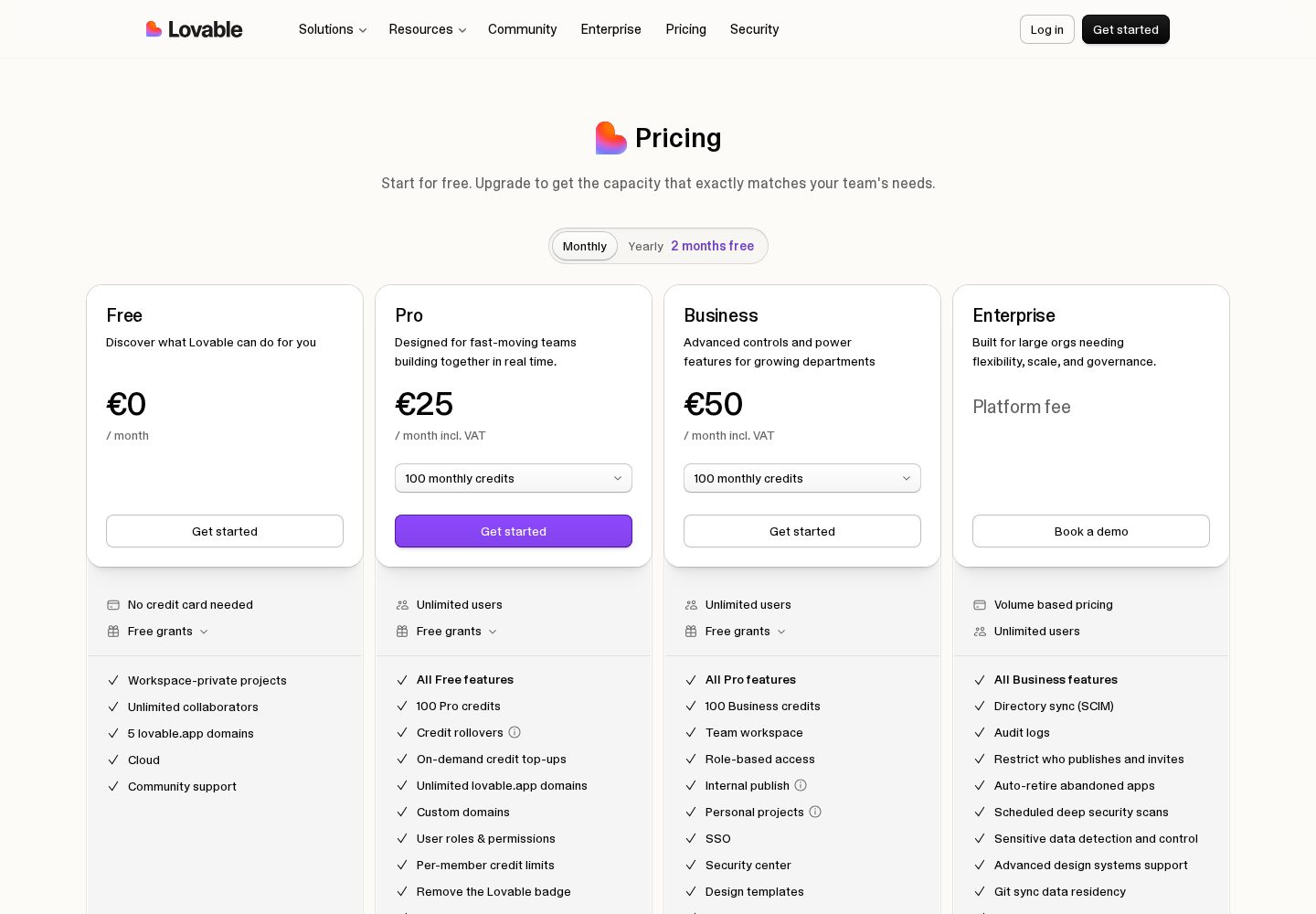
Lovable pricing plans
Lovable's official plan comparison shows its credit allowances and features for individuals and teams.
View official source: Lovable pricing pageLovable pricing: what you actually pay
The free plan includes a limited daily and monthly credit allowance with public projects. It is enough to build something real and decide whether the workflow suits you, which is more than most competitors offer.
Pro at $25/month is the plan most individuals should be on: a monthly credit allowance, private projects and custom domains. Business at $50/month raises the allowance and adds team features, and Enterprise is priced on request.
The honest caveat is the credit model. Price per month is not the number that determines your bill — number of iterations is. A founder who writes careful, complete prompts and reviews before re-prompting will sit comfortably inside Pro. A founder who treats the chat as a conversation with a colleague, sending twenty short messages to refine one screen, will run out early and buy top-ups. The tool is the same in both cases; the cost is not.
Against the alternatives, $25 is the cheapest serious entry point of the full-stack builders here — below Base44's $40 Builder tier and well below AgentUI's $50 minimum — and it is the only one at that price that hands you a GitHub repository you own.
Lovable vs Base44, Bolt and AgentUI
Base44 edges ahead for internal tools, where data structures, roles and approval logic are the product and design is secondary. Lovable is the better pick the moment a customer will see the screen. If you are building a SaaS product to sell, start here.
Bolt.new overlaps with Lovable for technical users but serves a different intent. Bolt is an in-browser development environment that happens to scaffold with AI; Lovable is a product builder that happens to produce code. Developers who want to take over immediately often prefer Bolt. Founders who want the app to keep working without them prefer Lovable.
AgentUI competes only in the internal-tools segment, and wins there on governance: SSO, audit logs, on-premise deployment and a human engineer on every plan. Lovable has no equivalent to that human safety net, but it also has a free tier and costs half as much to start.
- Customer-facing SaaS or marketing product → Lovable.
- Internal tool with complex roles → Base44.
- Developer-led prototype → Bolt.new.
- Enterprise sign-off required → AgentUI.
Ownership, security and going to production
Ownership is Lovable's strongest structural advantage. Because projects sync two ways with your own GitHub repository, there is no export step to negotiate and no proprietary format to escape. A developer can be handed the repository on any Tuesday and be productive the same day.
Security still deserves a deliberate pass before launch. The generated backend applies sensible defaults, but the rules governing who can read and write each table are only as correct as the description you gave. Test them by signing in as each role and attempting the actions that should fail — not by reading the configuration and assuming.
The other production habit worth forming is release discipline. Keep a working version deployed and iterate in the preview rather than making significant changes against a live customer-facing app, and use the repository history as the safety net it is.
Who should use Lovable?
Founders, product managers and designers who can describe what they want clearly and need a real, hosted product rather than a prototype — especially anyone building a SaaS MVP or internal tool solo.
Who should look elsewhere
Teams with a large existing codebase and strict internal tooling, who are better served by a coding agent inside their own repository, and anyone whose app is mostly a native mobile experience.
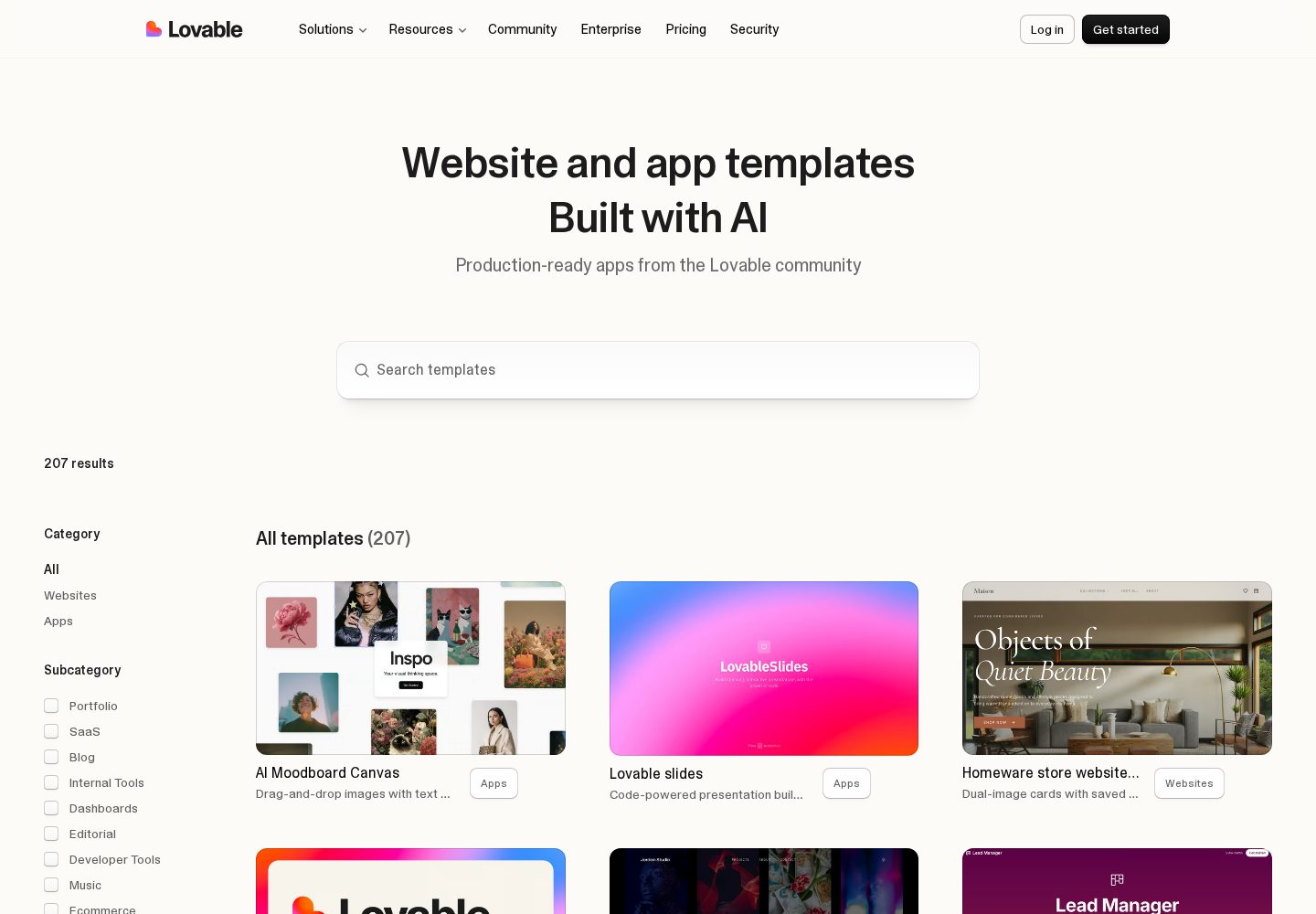
Lovable templates and examples
The template library demonstrates the range of public websites and app interfaces produced with Lovable.
View official source: Lovable templates libraryFinal verdict
Our runner-up. Lovable covers the whole path from a written idea to a hosted, working app exceptionally well, and because projects sync to your own GitHub repository you are not trapped if you outgrow it. Budget for credits if you iterate a lot.
Lovable FAQ
Is Lovable free to use?
Yes. The free plan includes a limited daily and monthly credit allowance; paid plans start at $25/month (verified 11 September 2026).
Can I export the code?
Yes. Projects sync two ways with a GitHub repository you own, so the code can be taken to any host or developer.
Do I need a separate database?
No. A database, authentication and file storage are built in, and you can connect external services if you prefer.
Is Lovable good for a SaaS MVP?
It is our top recommendation for one. The combination of polished interfaces, an included backend with authentication and payments, and a GitHub repository you own covers everything an early SaaS product needs.
How much does Lovable really cost per month?
Pro is $25/month and Business $50/month, but usage is metered in credits. Careful, complete prompts keep most solo builders inside the Pro allowance; heavy trial-and-error iteration leads to top-ups.
Can a developer take over a Lovable project?
Yes. Every project syncs two ways with a GitHub repository you own, so a developer can clone it, work conventionally and push changes back.
Does Lovable build mobile apps?
Its focus is web applications, which are responsive and work well on phones. For a native mobile experience distributed through the app stores, it is not the right category of tool.
Continue exploring
Related AppRank guides
Related comparisons
Relevant buying guides
Not Sure Which AI App Builder to Choose?
Get our free AI App Builder comparison guide.
No sign-up is required to read any comparison on this site.